

TellMeWhen for WoW Forever — Addons · WoW Forever
Icons you set up yourself that show cooldowns, buffs, debuffs and other combat states, with sounds and text alerts.
Usefulness
Verified workingVerified Nov 9, 2026
Its current release ships a version for this client.
- Verified release
- 12.1.5
- Interface
- 16001
- Category
- Buffs and debuffs, Cooldowns, Class tools
- Author
- Cybeloras
- License
- GPL-3.0
These are the addon author's own pages on other sites. Download only from them, and never run an installer an addon page asks for.
Usefulness by class
 Warrior7/10
 Paladin6/10
 Hunter6/10
 Rogue7/10
 Priest5/10
 Shaman6/10
 Mage6/10
 Warlock6/10
 Druid7/10
In WoW Forever
- Forever's own Cooldown Manager already shows key cooldowns and buffs, so start there. Forever also hides some combat data from addons, so TellMeWhen's buff and debuff icons may behave differently in combat: test a display before relying on it.
Overview
TellMeWhen puts groups of icons on screen and lets you decide what each one tracks and when it shows, using over 100 conditions. Unlike WeakAuras it has a Forever release, so it is the option there for building your own displays.
Who it's for
Players who want their own cooldown and buff displays, and any class with a rotation built around procs or debuff timers.
Main features
- Icons for cooldowns, buffs, debuffs, reactive abilities, totems and spell casts
- Over 100 conditions that decide when an icon shows
- Sounds, text and animations when an icon changes
- Bar display as an alternative to icons
- Profiles and import/export of icon setups
Screenshots
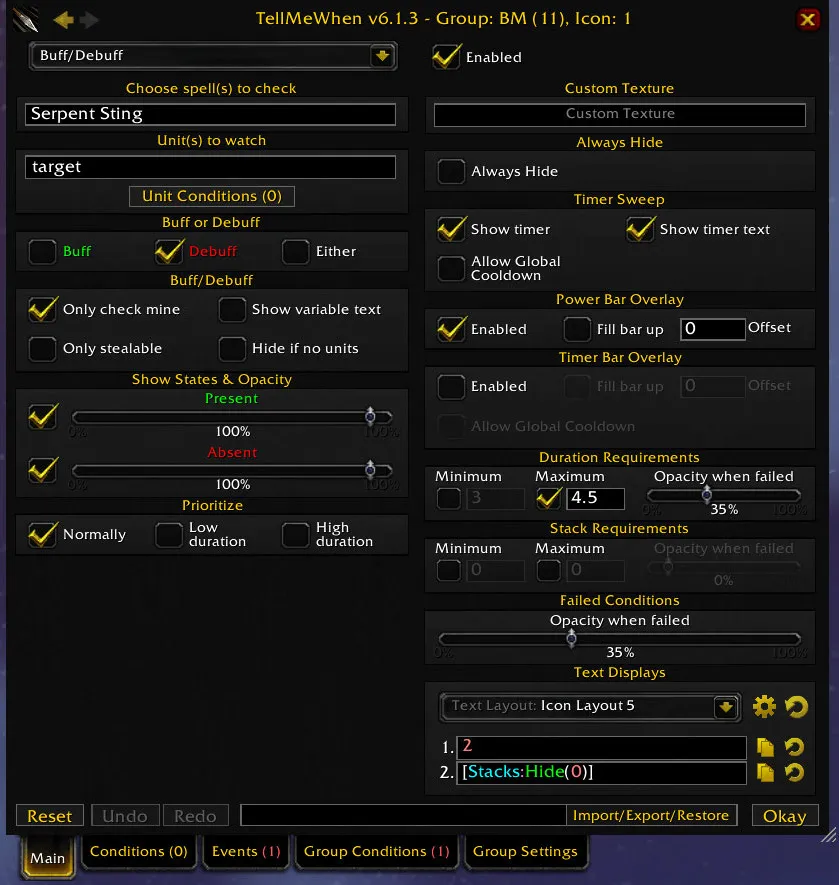
Pictures from the addon author's own project pages.
Installation
Download the WoW Forever file, extract it into _forever_/Interface/AddOns, then restart the game and enable it in the AddOns list.
_forever_/Interface/AddOnsWorks with
- Optional: OmniCC adds timer numbers to its icons, and Masque can skin them.
Configuration
Commands
/tmwLocks or unlocks the icons; unlocked, they can be set up./tmw optionsOpens the general settings.
First setup
- Type /tmw to unlock the icons, then right-click one to open its editor.
- Pick an icon type and enable it, or drag a spell or item from your spellbook or bags onto it.
- Type /tmw again to lock the icons so they start working.
Compatibility by version
| Game version | Status | Verified release | Checked |
|---|---|---|---|
| WoW Classic | Verified working | 12.1.5Oct 12, 2026 | Nov 9, 2026 |
| WoW TBC | Verified working | 12.1.5Oct 12, 2026 | Nov 9, 2026 |
| WoW Forever | Verified working
| 12.1.5Oct 12, 2026 | Nov 9, 2026 |
Recommended for
Where our class and specialization guides pick TellMeWhen in WoW Forever.
- Balance DruidOptional7/10
- Feral Combat DruidOptional7/10
- Restoration DruidOptional7/10
- Beast Mastery HunterOptional6/10
- Marksmanship HunterOptional6/10
- Survival HunterOptional6/10
- Arcane MageOptional6/10
- Fire MageOptional6/10
- Frost MageOptional6/10
- Holy PaladinOptional6/10
- Protection PaladinOptional6/10
- Retribution PaladinOptional6/10
Alternatives
| Addon | Usefulness | Status | How they compare |
|---|---|---|---|
| TellMeWhen | 6/10 | Verified working | — |
| WeakAuras | 8/10 | Not verified | WeakAuras can draw almost any custom display but has no Forever version; TellMeWhen is built around icons and bars and ships for Forever too. |
Often used with
 9/10
 8/10
 ThreatClassic28/10Partially compatible
A threat meter that shows your threat and your group's on your current target.
 ItemRack Universal5/10Verified working
Saves gear sets and swaps them from buttons, keybinds or automatic events.