

ItemRack Universal for WoW TBC — Addons · WoW TBC
Saves gear sets and swaps them from buttons, keybinds or automatic events.
Usefulness
Verified workingVerified Nov 9, 2026
Its current release ships a version for this client.
- Verified release
- 4.58
- Interface
- 20506
- Category
- Inventory across characters, Quality of life
- Author
- Bl4ut0 (original by Gello, Classic port by Rottenbeer and Roadblock)
- License
- Public Domain
These are the addon author's own pages on other sites. Download only from them, and never run an installer an addon page asks for.
Usefulness by class
 Warrior7/10
 Paladin7/10
 Hunter5/10
 Rogue5/10
 Priest5/10
 Shaman5/10
 Mage5/10
 Warlock5/10
 Druid7/10
Overview
ItemRack Universal stores full or partial gear sets and equips them with one click or key, and puts flyout menus on your equipment slots. It can also change sets by itself on events such as mounting or changing zone, and queue on-use items by priority.
Who it's for
Anyone who swaps between tanking, healing, damage or farming gear, and players who rotate on-use trinkets.
Main features
- Full or partial gear sets, each with its own key
- Movable quick-access buttons with flyout menus for equipment slots
- Automatic swaps on events such as mounting, zones or stances
- Per-slot queues that rank on-use items
- Tells apart copies of an item with different enchants
Limitations
- In combat only weapons can be swapped, and only with a key set through Bind Key; other swaps wait until combat ends.
Screenshots
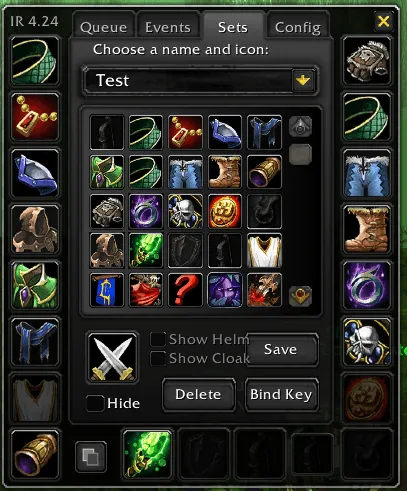
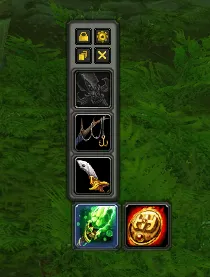
Pictures from the addon author's own project pages.
Installation
Download the WoW TBC file, extract it into _anniversary_/Interface/AddOns, then restart the game and enable it in the AddOns list.
_anniversary_/Interface/AddOnsWorks with
- The ItemRack and ItemRackOptions folders ship in the same download: keep both.
Configuration
Commands
/itemrack optOpens the options./itemrack debugTurns diagnostic recording on or off./itemrack dumpOpens a report you can copy for a bug report.
First setup
- Put on a set of gear, type /itemrack opt, name it on the Sets tab and save it.
- Use Bind Key on the Sets tab to give the set a key.
- Alt-click an equipment slot on the character sheet to make a quick-access button for it.
Advanced settings
- Automatic swaps are off until you turn on each one on the Events tab.
Compatibility by version
| Game version | Status | Verified release | Checked |
|---|---|---|---|
| WoW Classic | Verified working | 4.58Nov 5, 2026 | Nov 9, 2026 |
| WoW TBC | Verified working | 4.58Nov 5, 2026 | Nov 9, 2026 |
| WoW Forever | Verified working | 4.58Nov 5, 2026 | Nov 9, 2026 |
Recommended for
Where our class and specialization guides pick ItemRack Universal in WoW TBC.
Often used with
 TellMeWhen6/10Verified working
Icons you set up yourself that show cooldowns, buffs, debuffs and other combat states, with sounds and text alerts.
 WeakAuras8/10Verified working
A framework for building your own on-screen displays for buffs, cooldowns, resources and events.
 9/10
 8/10