


Cell for WoW WotLK — Addons · WoW WotLK
Raid frames with layouts per spec or role, built-in click-casting and many indicators.
UnverifiedVerified Oct 29, 2026
Not confirmed for this client's current patch. Check the download page before installing.
- Verified release
- r279-beta
- Category
- Raid frames
- Author
- enderneko
Download
These are the addon author's own pages on other sites. Download only from them, and never run an installer an addon page asks for.
In WoW WotLK
- Its Wrath file is made for Titan Reforged (interface 38002), a different client: on these 3.4.5 realms the game lists it as Out of date.
Overview
Cell replaces the party and raid frames. Its layouts switch on their own by spec or role and cover party, raid, arena and battleground groups. Click-casting is built in, there are dozens of ready-made indicators plus any you make yourself, raid debuffs are shown by priority with a glow, and it includes raid tools such as ready check, countdown, raid marks and battle res.
Who it's for
Healers and raiders who want frames, click-casting and raid tools in one addon.
Main features
- Layouts that switch by spec or role, for party, raid, arena and battleground
- Built-in click-casting
- Dozens of built-in indicators, plus unlimited custom ones
- Raid debuffs with priority and glow
- Raid tools: ready check, countdown, marks and battle res
Limitations
- It doesn't work with other click-casting addons.
- Custom borders and layouts that change with group size aren't supported, and its author doesn't plan to add them.
Screenshots
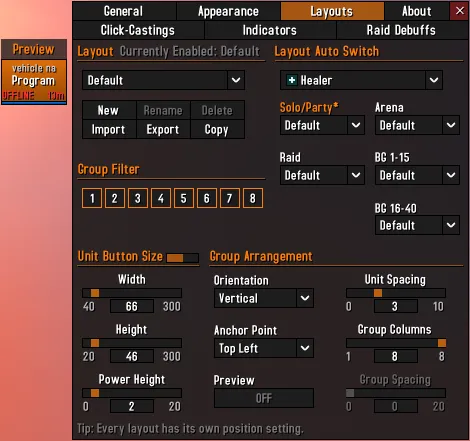
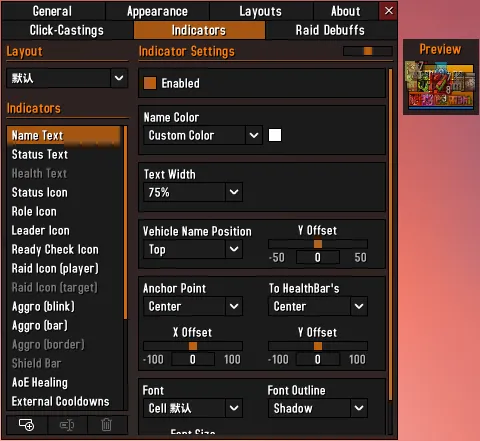
Pictures from the addon author's own project pages.
Installation
Download the WoW WotLK file, extract it into _classic_/Interface/AddOns, then restart the game and enable it in the AddOns list.
_classic_/Interface/AddOnsConfiguration
Commands
/cellLists Cell's commands and opens its options.
First setup
- Type /cell for its commands and options.
- Set up a layout and choose which spec or role switches to it.
- Set your click-casting bindings in its options.
Advanced settings
- Code snippets (Options > About > Code Snippets) can change how Cell works; if something breaks, try turning them all off.
Common mistakes
- Using another click-casting addon with Cell: it doesn't support them.
Compatibility by version
| Game version | Status | Verified release | Checked |
|---|---|---|---|
| WoW Classic | Compatible
| r279-betaAug 9, 2026 | Oct 29, 2026 |
| WoW TBC | Compatible
| r279-betaAug 9, 2026 | Oct 29, 2026 |
| WoW WotLK | Unverified
| r279-betaAug 9, 2026 | Oct 29, 2026 |
Alternatives
 VuhDoUnverified
VuhDo is aimed at healers, with click-healing and shareable profiles; Cell also switches layouts by spec or role and has raid tools.
 HealBot ContinuedUnverified
HealBot is built for click-healing with over 80 skins; Cell switches layouts by spec or role and has raid tools.