


Bagnon for WoW WotLK — Addons · WoW WotLK
Puts all your bags, and your bank, into single windows with search and sorting.
UnverifiedVerified Oct 29, 2026
Not confirmed for this client's current patch. Check the download page before installing.
- Verified release
- 12.1.7
- Category
- Bags and inventory, Inventory across characters
- Author
- Jaliborc, Tuller
- License
- All Rights Reserved
Download
These are the addon author's own pages on other sites. Download only from them, and never run an installer an addon page asks for.
In WoW WotLK
- Its newest Wrath file is for patch 3.4.4, so the game lists it as Out of date in 3.4.5 until it's updated.
Overview
Bagnon merges your bags into one window, so you don't open them one by one, and does the same for the bank. You can search for an item, sort on request, and look at the bags, bank and guild bank of any of your characters at any time. Tooltips also count how many of an item you have.
Who it's for
Anyone tired of opening bags one by one, and players with alts who want to check another character's items.
Main features
- All your bags in one window
- Item search and sorting on request
- The inventory, bank and guild bank of any character, viewable at any time
- Item counts in tooltips
- Custom skins and DataBroker support
Screenshots

Shows another game version's interface; it looks much the same in WoW WotLK.
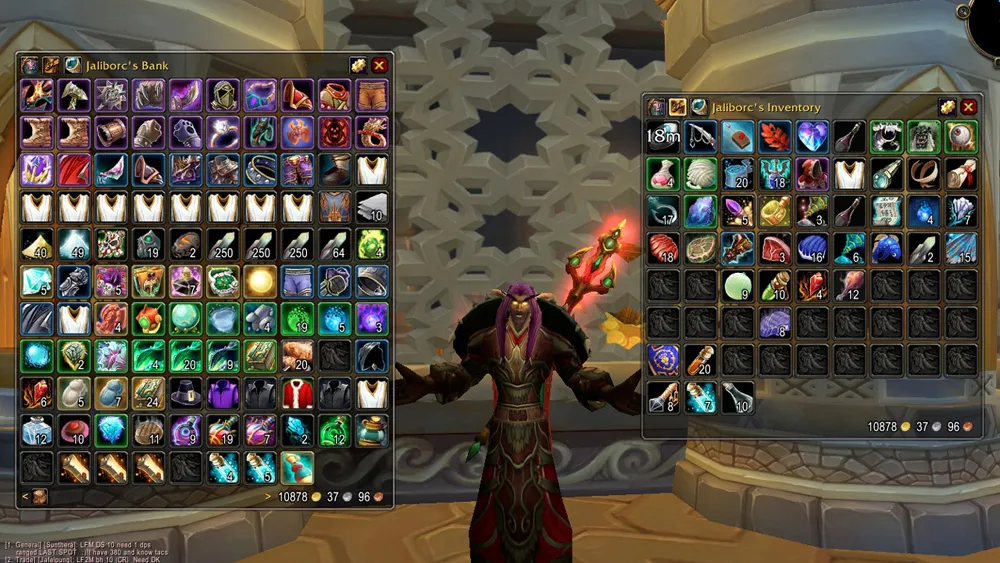
Pictures from the addon author's own project pages.
Installation
Download the WoW WotLK file, extract it into _classic_/Interface/AddOns, then restart the game and enable it in the AddOns list.
_classic_/Interface/AddOnsConfiguration
First setup
- Press your bag key: all your bags open as one window.
- Use its search to find an item, and sort the bags when you want them tidy.
- Open its options to choose how it looks and which items it highlights.
Advanced settings
- Plugins made by other players add more features; they're listed on its wiki.
Common mistakes
- Running two bag addons at once: both try to open when you press the bag key.
Compatibility by version
| Game version | Status | Verified release | Checked |
|---|---|---|---|
| WoW Classic | Compatible | 12.1.7Oct 15, 2026 | Oct 29, 2026 |
| WoW TBC | Compatible | 12.1.7Oct 15, 2026 | Oct 29, 2026 |
| WoW WotLK | Unverified
| 12.1.7Oct 15, 2026 | Oct 29, 2026 |
| WoW Forever | Compatible | 12.1.7Oct 15, 2026 | Oct 29, 2026 |
Alternatives
 BaganatorUnverified
Baganator offers a single-bag or a category view and needs the separate Syndicator addon; Bagnon merges everything into one window.
 ArkInventoryUnverified
ArkInventory sorts items into bars by categories and rules you define; Bagnon shows one merged window with search and sorting.